tiistai 21. tammikuuta 2020

ATV electric conversion part 4: Starting assembly


Continuing from previous part 1, part 2 and part 3.

After some consideration I ended up building simple L-shaped frame from rectangular pipe for the motor and welding it directly to the swing arm. In addition of being easier to build and weld, it also has the benefit of moving with the swing so chain stays about the same length all the time.

I'm not exactly proud of the welds itself (complete beginner), but  I am confident enough that they hold. Here is the swing arm shown from top.

And from bottom after few layers of paint and motor attached. One corner of motor point is not connected but I expect it to be just fine.

Chain was slightly long so I had to shorten it a bit. It didn't have master link so I had to take two pins out (with bench vice, few small nails and hammer) and pinning it back together. The rear part of swing arm is adjustable so tightening chain was easy enough; just loosen few bolts, adjust, then tighten again.


Moving on to final assembly. Here I just quickly replaced swing arm to check on how other parts could be positioned, without spring/dampener so it's not riding correctly yet.


I have absolutely no idea on how waterproof the electrics exactly aren't, but considering that they are built for this kind of use (scooter, ATV, bike etc) I'd expect them to have at least some resistance to waters. Either way, I am planning on adding some kind of plastic sheet there to at least guard them against smaller splashes they will encounter.

I wouldn't want to place controller in enclosed area due to thermal reasons (air cooling), so I was considering just hanging it (silvery box in picture) approximately there from engine mount from old gasoline engine. Here it's just hanging by a wire to illustrate the idea, I was planning on mounting it horizontally.
Battery might as well be at bottom there (or maybe a bit higher, under the bench) with simple mount to allow easy removal for periods when vehicle isn't used.

More about exact placement in next part.


perjantai 3. tammikuuta 2020

Around the world, and nothing truthful is on.


There once was a dream.

The dream was that the Internet, with capital I, would bring the world together in unity, to cross all political, religious and other gaps and make our world, in a lack of better word, whole.

Unfortunately this didn't happen. Exactly the opposite did. The world is, if possible, more divided than it ever has been.

These days everyone, and I do mean everyone, including myself, is firmly dug in their own little foxhole of opinion, and they won't even hear anything else. And this is all because of the internet as we know it.

The original dream was (I think, with my entrenched opinion) that since everyone could connect with everyone, there would be lot of cross-cultural and cross-political dialogue, bringing people together. After all, this had happened before, under more physical circumstances. Trade between neighbors brings the world together like nothing else.

That didn't happen on the internet. What did happen, instead, is that internet allowed people to find peers, other people that think alike and dig in with them, blasting out their own version of Ride of the Valkyries so that no dissenting voices could be heard, and actually actively closing themselves out from hearing anything not in line with their opinions. People all over the world did this very same thing with their own peer groups, often without even realizing it, and the result is what we have now. World divided.

There are, of course, people who love this division, thrive in it and even actively work to encourage it. Divide et impera - divide and conquer. Make people hate each other so they don't notice what you are doing to them. Some people of course are true believers, but these days it seems that the huge majority of active - that is, most often posting and most vocal - people are fake. Imaginary people, made up by someone just to further the division.

The main service providers in internet - and this with absolutely no exceptions includes every single large-scale service operator you might know or have heard of - are actively contributing to this problem by implementing services and policies that allow and even encourage this behavior. The rich and the politicians have their own goals and since this benefits them, too, by distracting people from nefarious stuff they are doing, so they, too, encourage it.

As I write of this, another huge distraction appears to be nearing flash point at middle east while huge chunk Australia is burning with temperatures reaching all time records.

I often try to think up some hope when discussing this kind of current topics, but alas, this time I see none. Too many people have too much to gain from the current situation, either by allowing them to live in denial or by allowing them to profit from said denial, so I can't see anything changing anytime soon.


So in meantime, here's a puppy enjoying a summer day at a lake.


perjantai 20. joulukuuta 2019

Controlling things remotely


We have a small "summer cottage" some 100km away from here. Since it has running water, it needs to be heated during winters, and we're using electric heaters for that. This obviously is somewhat expensive and wasteful, since outside temperature can vary a lot; when it's close to zero (celcius), only minimal heating is needed; but when temperature drops below -20, a lot more is needed.

Also, it would be nice if we could up heating remotely. Like a day or so before going there (yes, actually we go there, for a day or two at a time, during winters too) I could set heaters to 20 degrees so it would be a bit warmer when we get there. For this remote control systems exist, but are somewhat expensive to install and run, so I'd like a bit different setup.

So the rough plan is to have "all-time-on" heaters (set to minimal temperature, around 10c) that keep base heat up, and then maybe another set that can be activated when temperature drops too low (additional heating on very cold weather, this will be done automatically by the system), and third set that is set to 20c, to heat place up before we go there. This setup should make huge improvements to both overall energy consumption and comfort.

Of course it would be nice to get fully remote-controlled heaters where both "on/off" and target temperature could be set via remote system, but so far all I've found are proprietary systems that are controlled with their own hub and mandatory cloud bullshit, so that option is off the table -- for now at least.

I already have set up temperature monitoring system there (I can see from home how the temperature actually is - especially inside, in case there are power outages or periods of extreme cold; frozen water pipes is something I absolutely, positive don't want), so I was thinking I could add heater controls to that system. It already has own GPRS module to send temperature data, so it could equally well receive commands back when contacting my server (every few hours or so)

The current heaters, like said, are mains electric powered, 4 total, and their individual power varies from 1000 to 3600 watts, total power being somewhere in 8 kW range. A figure that I take seriously; I don't want anything to overheat or worse, burn if something goes wrong with control systems.

Easiest way is remotely controlled power outlets, and there certainly are many of those available. Many require their own SIM (each, not good) or proprietary protocols (zigbee with central hub) to control them, so those aren't great or easy to use.

Then there are simple sets available from neighboring shop, cost being full 16€ for three 3.6kW-capable outlets and handheld remote control unit, using I think 433 MHz band. I don't even need to mess with outlets (therefore keeping them as safe as they could be), I just can hack the remote!

Remote control comes apart easily, and as expected it's simple unit; single chip as controller, few RF components and buttons. Unfortunately (but I kinda expected it) buttons are in matrix, and after some measurements I determined it's 3 outputs and 4 inputs, for 10 buttons total (channels ABCD on/off, and one master on/off). Single input per button would been easier to interface but this can't be helped.

Buttons are usual type for this kinds of devices; just pads on board, and pressing button shorts them with conductive material. My original idea was to solder a FET on button pads I needed to control (three channels, on/off, so six total), but they are covered with carbon contact material which made this idea impractical (I didn't feel like peeling the carbon off, as it might damage the board/contacts).

So next best option was to put these to separate board, a bit like this:


This is just for first test. I've only connected channel A here (pin 6 being output for first four buttons, and 12/13 inputs for buttons 1/2 and (so far unconnected) 5/6 and also 9/10 (master channel I don't need so I leave unconnected.)  And it works; I can control channel A by pulling gate of those FETs high or low. Nice!

I already placed all needed FETs on small board. On horizontal are "output" channels (I need only two out of three),  and on vertical "input" channels (all four needed). Now I just need to connect remaining wires between these boards, and then FET gates to pins controlling them on third (main controller) board. Remote uses 3v battery, so that power comes from main board as well.

All in all, I should have nice test setup running shortly.


sunnuntai 15. joulukuuta 2019

ATV electric conversion part 3: fitting in


Previous part here .

Last time I mentioned apparent problem, and here it is. The picture shows how I originally planned installing the motor, but note the small arrow indicating rotation direction.


Yeah, that is not going to work. Installed like this the ATV will run in reverse, which is pretty far from my intention. After some reading, it's apparent that this motor type doesn't like running in reverse, as it could just burn out or shorten its lifetime a lot, so that simple solution is out of the question. Not to mention the motor's sprocket attachment nut; it might rotate open and drop off if motor were ran in reverse. So not good.

I considered rotating motor around and adding transfer axle between it and rear sprocket. That is, there is one chain going from motor to this transfer axle, which then and pulls another chain that is in line/connected to rear sprocket. I quickly gave up with that idea though; too much complexity. And finding suitable axles and sprockets ended up being near impossible, as they come with different center holes (star-like attachment; D-shaped hole, double-D/oval shaped and so on. No suitable combination was readily available. I don't consider my machinist skills to be good enough to make adjustments to parts so they should be ready as ordered.


This doesn't show angle very well but you can see the rear axle and chain sprocket behind the motor. Square tube is there to mark straight chain path. This is my alternate plan at the moment. This is under rear mud guard so motor fits there nicely, but so far I haven't figured out how to build new attachment for the motor. Or, more precisely, I have a rough idea how it should be built, but no idea how I make the placement match when attaching everything together in the end.

There's also few other attachment position ideas I have, I need to think about them as well.


torstai 24. lokakuuta 2019

ARB waveform generation


I've had GWInstek AFG-2005 pulse generator for a while, but so far I haven't needed to arbitrary function generator part of it. Now, however, I ran onto a case where it would be useful so I downloaded the PC software to see how difficult it would be to generate sequence I need.

Knowing that many of these manufacturers' software is, shall we say, of dubious quality, I kinda expected at least some amount of frustration, although GW's reputation isn't even close to worst.


First troublesome thing is that it uses memory points as horizontal axis, instead of time. I don't care about points! Give me time axis! Going through menus quickly, there is "period or number" selection but that doesn't seem to change anything. Figures. (pun intended)
 
On vertical axis; generator has 10-bit (so 1024-level) output, so values go from -511 to 511. -512 is not apparently there (so 1023 levels, not 1024), which doesn't bother me too much actually. Again, I'd prefer voltage, but meh, this works for me, at least for now.

(later note: actual output level can be set via generator itself, and -511..511 matches set full peak-to-peak range.)

I wanted to start with simple square wave, and there is handy dialog for this.


There was output rate selection when opening the software, and I think I selected 100 samples/s there. I wanted 10 pulses over 1 second, and it took me a while to figure this out. Points, period and freq here indicate same thing; total length of generated sequence. Below those, 'cycle' indicates how many cycles of signal to create. A bit confusing but okay-ish...

So after this I got the first screen. My signal is kinda tiny there, on right hand corner, right? Okay, let's zoom in and ... What?!?

Why is this zooming also vertical axis (so with some zooming vertical is reduced to 500), I wanted to keep my whole signal range on view? And why is there that brief period of inactivity in start? And why is there some 12 cycles instead of 10? What?

(later note: after some more fiddling around, it seems that this generate button is "apply more data to end" and not "generate signal", so I guess there was something already from what I did before getting here.)

But okay, let's try this. Send to instument.. I don't feel like taking another picture anymore, but why is this suggesting some random range by default (start 0, length 20), instead of the entire signal I just generated here? Sending worked well enough with USB and generator switched to it automatically. And yes, generated output is same as here, with that unwanted blank period in there as well. Although I had to set frequency on the generator itself to 1 to return this signal to the length I actually wanted.

The waveform is saved with CSV extension, but unfortunately it isn't CSV as in Comma Separated Values file generated by for example Excel. It is text file nevertheless so if (I think that's "when") needed I can generate it manually. Why is there that comma between "Start:" and value though?

Start:,0,
Length:,100,
Sample Rate:,20000000,
511,
511,
511,
511,
511,
...


...All in all, this thing is not great, but I can work with this.

Edit a bit later: After turning the signal generator power off and back on the next day, I was pleasantly surprised that it had previous mode set; ARB with frequency I set. After some puzzled testing I was somewhat less pleased to find out that this was effectively a lie; it was not outputting the waveform I used last time but some basic square wave instead. Not nice.


sunnuntai 20. lokakuuta 2019

Keyboard layout issues

Bit of mild rant, bit of memory lane...

Back in the 90s, when I first got into flight simulators, I learned the hard way that I had to switch the computer to US keyboard layout to even play the games. This was because Finnish keyboard layout has keys 1-0 and + and ´ on top row (excluding whatever is the leftmost key, and backspace), while games expected US layout where keys there are 1-0, - and =. On Microprose simulators and many others these keys were typically used for throttle controls, so without them even take off was impossible. Between different keyboard layouts only A-Z and 1-0 are common between layouts (completely ignoring non-latin alphabets, and even within latin charset there are exceptions like AZERTY layout), and pretty much all other characters move around when switching between them.

I recently bought Stardew Valley and found it surprisingly fun game. It did, however, bring me back few decades due to this very same keyboard issue I though long since solved.

Why this came into my mind is that Stardew Valley has keyboard shortcuts, 12 of them to be exact, for quick access to items. Short cut keys being 1-0, - and =, to be specific. So, the abovementioned US layout. And of course it doesn't work properly with Finnish layout, not with the actual keys, nor by using, say, - character (which happens to be in bottom row in this layout). So I can't use two rightmost items with keyboard. And here I thought we had left these issues behind some 20 years ago.

Funnily enough, it shouldn't be that difficult to make game keyboard universal. Almost all keyboards have operated, and as far as I know, still operate only on "scan codes" that indicate physical position of a key on keyboard that was pressed or released, and translation to actual characters doesn't happen until your operating system gets involved. Keyboards are all standard these days regarding normal keys, and only vendor-specific keys do require specific driver to translate them to useful function.

Last time I actually dealt with the scan codes was some 20 years ago so my memory may be a bit hazy here, but I seem to recall that it mostly went top to bottom and left to right; ESC being 1, F1 2, then proceeding to I think F10 (F11 and F12 being added later to sequence and therefore had different codes) before proceeding to next row; the leftmost key, 1 onward until backspace, then tab... And keypad portion later on sequence.

Operating system (or more specifically, keyboard driver) typically takes care of translating these codes to actual characters so often you don't have to even know about them on application level. Only when building things like Stardew Valley's 12-item shortcut bar you'd want to take different route to avoid the layout issues like this.

Most, if not all common APIs do report keyboard scan codes as well on key press, so all game would have to do here is to track them instead of characters to make your game work regardless of user's keyboard layout.

The other part, showing user the key "name", I haven't ever used, but I am certain that somewhere there is a application-level function to translate scan code to key name too, just for this purpose. And voilá, no more keyboard layout issues!

Now I just have to wonder, if user isn't using QWERTY layout (but something else like AZERTY), do character movement break too, since game uses ASDW for directional movement? I'd hope not.


tiistai 15. lokakuuta 2019

ATV electric conversion part 2: The parts


Previous part here .

I avoid mentioning any brand names here, for no special reason, I just don't want to. It is not hard to find similar (or exactly the same) parts for yourself.

Looking for components was kinda annoying. I started from US-centric site and found many great looking alternatives, but almost without exception they were not shipping to Europe. Fortunately Ich kann wenig Deutch sprechen so I could go to German site and for parts there. The selection appears to be much smaller for some reason, so some compromises needed to be made.

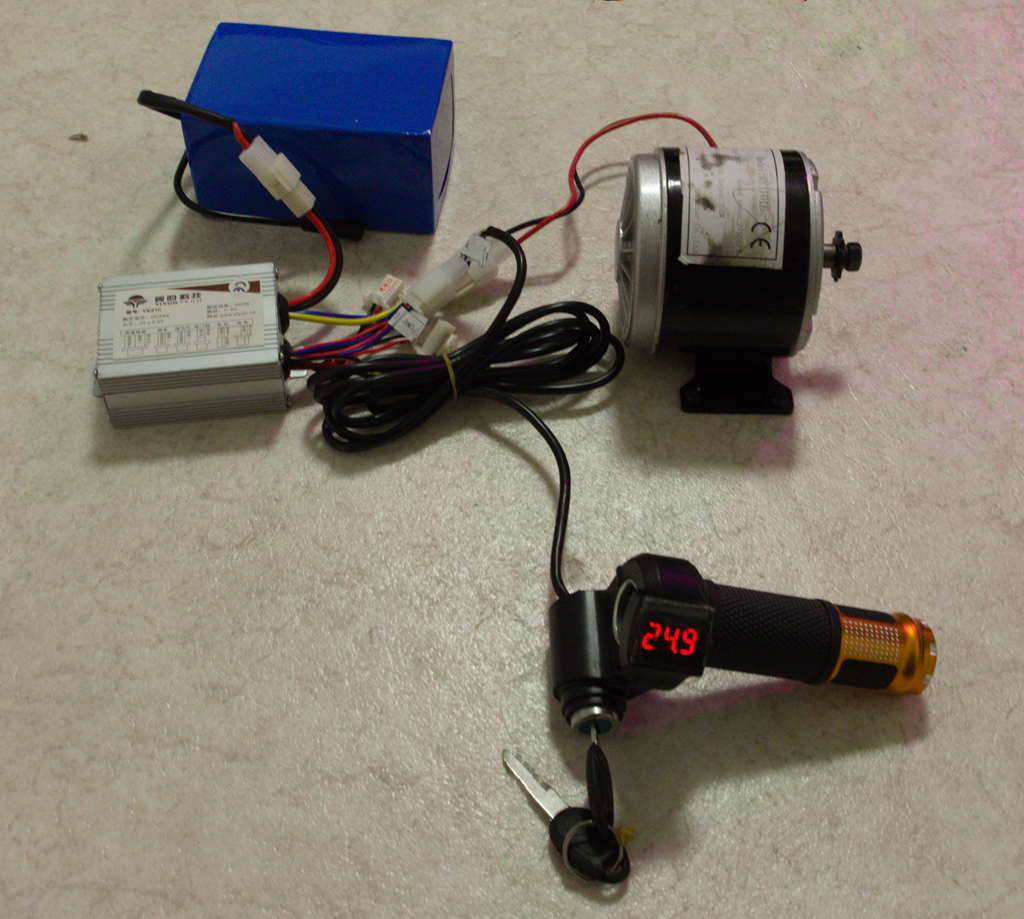
It took a few tries (first on US side, then German) to refine my searches to suitable keywords so started getting what I wanted. For motor and controller I searched for "24v motor kit" in few variations, eventually ending up with 350W set that included controller, throttle, motor, chain and few other parts (for total of about 100€).

Next was battery. While a lead-acid battery (or two) could be obtained for less, this kind of use requires deep discharge batteries that tend to be more expensive, so I went for lithium-ion battery.
I quickly found suitable-looking 24v 20Ah unit (for about 200€), so no problem there.

A quick mention of prices: At no point I expected this to be, shall we say, frugal project, as already built electric ATVs can be found on market for less. For me, this is learning project first and foremost, and getting dead ATV running (instead of calling it a total loss) for enjoyment of kids will be nice incentive to get this done.

Before going any further I of course wanted to test that things work properly. Battery had wrong kind of connectors (as I pretty much expected), but changing it was very simple operation as motor kit came with correct connector blank. Just be very very careful not to short those battery wires during this operation...


Connect everything (well, main parts), turn key and it came alive. Twist of throttle starts motor, and although everything works nicely, I also immediately see that my previous fears of a serious build problem are confirmed and I have to figure out solution to that before build can proceed much further.
 
Next up, taking apart the ATV itself.